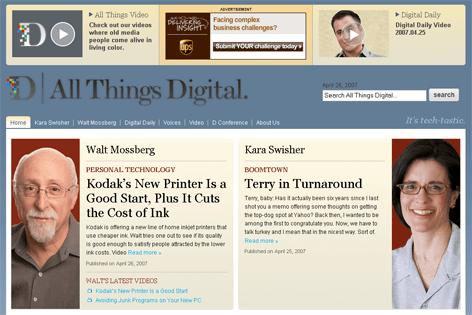
All Things Digital has launched

All Things Digital

Tonight we launched allthingsd.com !

It’s the new home home of Walt Mossberg (plus his 2 year archive of WSJ columns), Kara Swisher and John Paczkowski (aka ‘Digital Daily’).

The project was an amazing team effort, and it was a pleasure launching this site with such an outstanding collection of people. As Brian Oberkirch summarized so well, allthingsd.com is …

powered by WordPress MU as part of the VIP hosting at Automattic. (Yay Barry. Yay Matt.) The wonder kids at Mule Design did their usual magic on the site. Rockstars Alex King and Adam Tow built it out and added the custom fu needed for all the functionality. Raanan Bar-Cohen and Beth Callaghan made it all work.

I’d also like to thank Tony Conrad and Martin Remy @ Sphere for working on the allthingsd Sphere Widget, and Rick Klau and Don Loeb at Feedburner for their help on all things RSS.

There were countless people who assisted from the Dow Jones Online team, such as Christine Mohan , Daniel Bernard, and Pete Kostakis, and they were especially kind to accommodate our 24/7 schedule πŸ™‚ Thank you all …

Great job everyone, now click over and check it out.

“A Morphable Model of 3D Faces”

via wired.com’s blog table of Malcontents:

Volker Blanz and Thomas Vetter of the MPI for Biological Cybernetics in Germany have come up with a morphable model for three-dimensional faces. What their system does is build a single master face out of a series of two hundred source faces, differentiated from one another by a vast spectrum of different features. This master face can then be easily morphed into any combination of features, allowing it to easily transform into any possible face (barring disfigurement).

But it gets cooler. The program can take a single 2D image of someone’s face and create a completely accurate 3D head model. Tom Hanks and Audrey Hepburn are the source images they use to demonstrate the process and the result is eerie and nearly indistinguishable.

left lane hoggers

Just a quick follow-up to my fun drive to DC w/ GPS.

I drive rarely, but when I do it’s often more than a quick spin — usually to DC, NJ, or someplace like that. The rest of the time I take mass transit, which, like all new yorkers, makes me a green citizen:

New York City… is responsible for 1% of the nation’s total greenhouse gas emissions.[2] They city’s levels are nevertheless relatively low when measured per capita, at 7.1 metric tons per person, below San Francisco, at 11.2 metric tons, and the national average, at 24.5.[2]

But I digress.

*begin rant*

When I do drive and run into traffic, it’s usually on a two or three lane highway, and without fail I see a fundamental driving error being committed by 95% of the drivers — they “hog the left lane”.

The left lane is for passing. It’s not for simply driving 5 miles above the speed limit, or slightly faster than the right lane traffic. Continue reading

Why I love in-car GPS, and how it can be made better

GPSLast week I drove down to DC and made sure the Hertz rental car had GPS.

The drive from new york to DC is fairly straightforward, but I still don’t know my way around DC that well, and after living in new york all these years, any city that’s not setup as a grid of streets and avenues just seems extra difficult to navigate πŸ™‚

So the GPS unit — I believe called NeverLost V3 — worked pretty well, although it got a bit confused on 95 a few times reminding me to “keep to the left FOLLOWED by a keep to the left” even though there weren’t any exits or turns to take.

But I really do love GPS navigation. Not having to be on the lookout for exits that have a starbucks ( it’s all displayed in the GPS dashboard ) is huge, and also not needing anyone else in the car to help navigate is a big win.

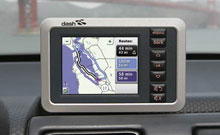
But the big missing feature is traffic info. Selecting “shortest time” really is just a guess. Google Maps on my blackberry includes some traffic info, but not enough to help me avoid delays. A few companies like Dash have introduced traffic info in their GPS devices by using historical traffic information, and adding a novel approach of getting traffic info from other cars on the highway that use the Dash system — very cool. ( update: Dash is looking for beta testers )

The flaw with this system is that you need everyone using the same manufacturers GPS system, and that’s just not going to be a reality anytime soon given all the various companies that are putting out GPS devices.

What we need, in my opinion, is an opt-in, open standard for sharing in-car/traffic information that any device and any opted-in person can tap into, plus a commercial consortium or W3C style governing body to maintain and evolve a standard. This data would then be stored centrally or perhaps in a non-central torrent style cloud of people within a 50 miles radius ( this needs more thinking and flushing out πŸ™‚ ).

And as GPS is incorporated more and more into our mobile phone devices, that should give us a huge installed user base of in-car and mobile devices sharing information about traffic and other conditions. That would be infinitely better than participating in the manufacturers small group of users, and would dramatically increase the chances of having tons of good data on the highway you were looking to avoid b/c of traffic.

The manufacturers would then compete on interface design, features, UI, etc. In addition I would require people to share info from their car if they wanted to get access to the data – think bittorrent like in that you can’t get data without sharing data. That way you could opt-out and simply not get traffic info if you were worried about privacy/tracking.

ringtones: ideas on making them more useful

ringtonesRingtones are a huge business. According to BMI (via wired.com’s Listening Post blog), revenue exceeded $600M in 2006, but is now in a slight decline for 2007.

So why the downturn, and does this model of charging for a short clip of music makes sense ?

I think people love to customize and personalize their phone, and ringtones in that vein make a lot of sense. We see this phenomena of personalization every day in line @ starbucks when someone calmly asks for an “extra hot, double latte with no foam, half skim half 2%” πŸ™‚

so why the downturn ? some possible reasons:

1) with any new product, the people who consume the product eventually fatigue, and the pool of new customers begins to dry up

2) smartphones make it easy to transfer music to your phone. I’m in this camp – never purchased a ringtone, and now move WAV and MP3 files to my phone if I want some new ring.

3) bluetooth headsets. Ok, maybe this isn’t a biggy, but I see more people being “always on” their own phone and not needing a ring, but simply “click” to turn on their headset.

4) free alternatives. lots of activity in this space.

But what about the model of charging for a ringtone, and often charging for a short clip of a song you already have paid for ? I think in this case, the mobile carriers have been providing a solid service and the market has dictated the value of this service — but I see a larger opportunity for other services.

A ringtone is a public performance in many cases. It’s very common for your phone to ring with many people within earshot, and at the very least you yourself are listening to that ringtone. Given that, shouldn’t we treat it as such and not hear the same ring over and over again ?

With the full understanding that this could become annoying if abused, here are some ideas:

1) free updated ringtones with your favorite sports / news / RSS headlines. If you are a Mets fan, how cool would it be to get the 8th inning score when your phone rings ? Or the latest headline from techcrunch !

2) new product launches. Give away a fun ringtone that also conveys what your new product is good for. This could work really well for products that have a very loyal/fanatical customer base (think apple, toyota, or a new music album) which already blogs about products, created elaborate message forum signatures, etc. Example: “<jingle> – 2008 Prius just broke 100MPG“.

3) Political ads. This could work as both attack ads, and endorsement type of ads. I could see inside the beltway staff in DC having ringtones of “I voted for the 87 billion dollars before I voted against it

4) customized ringtones pulling in RSS. Example: If a friend calls, pull in their latest RSS headline from their blog/facebook/mysspace/etc and convert it to speech. That way you have something timely to talk about when they call you πŸ™‚

5) and this one is in the category of I hope it doesn’t get abused, but probably will — build a marketplace for paying people to use your ringtone. Ideally people would be shamed into not getting paid for really lousy and annoying ringtones, but if a company like Coke is spending millions on marketing, why not pay people to play your new jingle ! Or on a thursday before a big movie opening, pay people for ringtones promoting the new flick.

Then again, maybe we’ll see a trend in phone etiquette where people will use non intrusive means for getting alerted to a call …. unlikely, but one can hope πŸ™‚

FPS games, a look back and why I seem to still need a keyboard + mouse

WASDFirst Person Shooters ( FPS ) games are great, and it’s the genre that I really got into for a while — mostly in my late high school / early college years. The first game in this genre that really grabbed me and put me in this zone was the FPS game Wolfenstein 3D, followed by Doom ( modem to modem style ), and then my big time waster QuakeWorld w/ Threewave CTF ( old timers remember that QuakeWorld was an optimized Quake version for 56K/ISDN usage /200+ms ! Until QuakeWorld, the folks at id were all playing on T1s and had no idea what lag was like on a 56K connection ).

I played Wolf3d, Doom, and Quake1 all with a keyboard, no mouse. I used tons of keyboard shortcuts for certain moves, and it felt crazy to not use a joystick, but it all seemed to work great, and I was always near the top of the list for any given game.

Then came the 3dfx grafx card that I had to have, and it really changed the PC gaming scene. 3dfx was formed by a bunch of former SGI folks, who wanted to bring big time 3D grafx to the masses. The first generation Voodo card was an add-on card that kicked in any time you fired up a 3d game, and it really upped the stakes ( brought OpenGL into the mainstream too ), and made 3d style games look great and feel much more immersive.

All of the sudden I actually wanted to look around in 360, and I made the switch to keyboard + mouse, using what was then called WASD ( W to move forward, A for left, S for back, and D for right ). The mouse acted as my viewpoint, so that I could now move at will, and look anywhere. Capture the Flag (CTF) QuakeWorld games also introduced a grapple that made the maps much more 3D and meant that you had to be aware of your surrounding – and be ready from any angle.

And so the controls were set, a super fast laser powered mouse, plus a few simple keyboard keys, and every FPS I played from that point on – Quake2/3/Arena/UT mods, and Halife 1/2, were controlled in the very same way.

It became like second nature to play keyboard+mouse, and the pro players, and tournaments that followed, all were based on a similar controller setup.

I then fell out of gaming as RealLife took over, random free time was diminished, $$ spent on upgrading a PC seemed like an irrational thing, and the overall learning curves for games seemed to get higher and higher.

I didn’t play much of anything for a while, until I received a PS2 as a gift. I dipped my toe back in, mostly playing sports games, but tried a few FPS games as well. Sports game were great with a console’s controller, but FPS games seemed just wrong. I needed my mouse + keyboard, and I needed a true FPS angle, not this 3rd person stuff that seems to be the rage on consoles.

I’ve now picked up an Xbox360 – and if I’m lucky I get to play 1 hr per month. I still enjoy sports games – Tiger Woods, Fifa, etc — but I kept reading about how great Gears of War was – so I picked that up too. And yes, it’s a great looking FPS game on my 40″ LCD HD, but the controls still seem all wrong ! I’m pretty good at learning new things, but how do you aim with precision when it’s a controller ( hint: many of these games auto aim for you ).

What’s wild is to see a generational shift from keyboard+mouse –> console controllers all because of one game — Halo. People who grew up in gaming with an Xbox have only played with a controller and look at us old guys as relics. To be fair, there are some hardcore gamers out there that say “get a keyboard+mouse and hook it into the Xbox360” – gizmodo reviewed such a product, and the comments could have come from me:

“I always prefer keyboard and mouse – more controls, more configurable, easier to combo. Not to mention that I’ve spent/wasted way too much time honing my keyboard/mouse skills in Quake to give it up.”

Fantastic idea. I’m a PC gamer and could never see myself using the standard Xbox controller for FPS’s. This has me one micron closer to a console, but for now i’m sticking with the PC

I’m personally not keen on introducing more gadgets that into the living room, but I do wonder how many people do that.

So not sure if I’ll ever quite master using a controller for FPS games on the console. And maybe that’s not such a bad thing — as RealLife does have many advantages over gaming πŸ™‚

twitter on SMS ? why not use mobile web or mobile IM ?

twitter

Lots of buzz about twitter these days, and I must say the service is really growing on me.

( if you don’t know what it is, the best way to explain it is to look at this: twittervision.com ).

One thing I’m not sure I understand is why people elect to use SMS with twitter. I see two problems: 1) diminished importance of SMS messages which I have set to alert me in a similar fashion to a phone call and 2) depending on your cell plan, you only get about 100 SMS messages/month included for free.

I see tons of people getting messages all day long, and then getting crushed by the cost of all these inbound SMS mesages.

Why not use mobile web, or a jabber/gtalk IM on your phone/blackberry. That way it’s easy to see and track, plus it’s part of your data plan in most cases.

Apple TV – thoughts on other devices and media implications

apple tv

Apple TV (AAPL) is getting good reviews so far, and the inevitable hacking has also begun that i’m sure will extend the functionality ( and void the warranty ! )

For me, I’m holding off for now. I usually try to buy the 2nd generation of most new product ( I bought the iPod nano, not the Mini – recommended the treo 650, not the 600, etc ). I’m also keeping an eye on the slingboxpro which looks really compelling and adds the mobile feature that I’m really keen on getting.

The big news in my mind with Apple TV and other similar devices is not watching Lost via iTunes on the big screen (although that’s nice), but rather the democratization and leveling off of the playing field that these devices create.

Ask a Ninja, Tikki bar tv, diggnation and other great video podcasts are now on equal footing for my attention when I have an hour to kick back on the couch and watch something fun. Production values/costs are obviously different, but I really just want to be entertained, and some of these podcasts do a great job at that. Couple this Apple TV movement with cheap Sony HD cameras, and you really start seeing the shifting landscape.

Experiment: went 100% mobile after hours

bb 8700So for a few days last week I tried to see what would happen if I relied exclusively on my blackberry 8700c, and skipped carrying home the 5.5 pound notebook or using any of my 3 machines at home.

Here are how my usual tasks faired:

– work email:
1) obviously the blackberry is pretty solid in this arena.
2) any email over 10 or 15 lines long I generally skip.
3) I miss the “follow-up” outlook flag, and the ability to move emails into folders
4) I really miss the color coding ability to quickly spot important emails
verdict: i can get by on just blackberry for email for after hours usage, but the “maintenance” work I do on all my emails at night cannot be done on mobile.

– personal email
1) gmail downloadable mobile app is great and really works pretty well.
2) I do wish gmail did not cut off long messages such as paidcontent’s
3) for some reason I was not able to open any draft emails on gmail mobile.
verdict: good enough for the light personal email stuff that I do at night.


– RSS reading

1) I know there are a bunch of rss readers out there, but none seemed to work great for me. I’m about to test out litefeeds but haven’t yet.
2) I ended up reading most of my RSS via the google ig homepage and myyahoo mobile
verdict: not quite ready for primetime, but i need to do more research.

– photos
1) Yahoo!Go works great on my bb 8700. Once you sync in your flickr photos, the experience is pretty good
2) able to see new photos for my contacts
3) able to see and write comments
verdict: excellent experience

– general news browsing
1) most sites I follow have either a mobile friendly version, or have nice XHTML/CSS that renders well on mobile devices
2) anything long format — over 1500 words — is not really workable, but the blackberry scroll makes it OK
3) images now render pretty well, so you feel like you are getting the full story
4) video / audio are a no-go ( for now ), so I do miss that
verdict: pretty good. latency/lag/speed are still big issues, but if I had to choose between a newspaper and a blackberry for news, I’d choose the latter.