Eight Things to Fix in Offline Google Mail

Way back when, I used to use Google Gears to run gmail in offline mode in Firefox – usually when on a plane without wifi. Eventually Gears was retired, and a while after that, Google released a chrome app called Offline Google Mail that looked to do most of what you could once do with Gears.

I know I can install Thunderbird or run Mac Mail to do email offline, but I like the idea of using just my browser and not installing or running other client apps.

So on a recent trip Virgin America had non functioning wifi, and on the other leg it just barely worked. So I figured I’d put Offline Google Mail through it’s paces. What I found was pretty lacking and I took some notes πŸ™‚

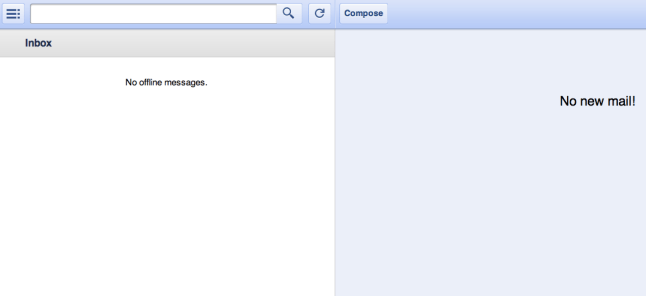
  • 1) This is a biggie. It won’t work if you are offline ! WTF you may say ? “Offline” is in the app name. Yes, but to make it work, you need to first launch the app while you are online and then keep the browser open. Otherwise you see some version of the screenshot above. Β This seems like something that has to be fixed — as you never know when you might need offline access, and certainly don’t want to have to plan for it.
  • 2) Reply-all always CCs me the sender. Small thing, but annoying to have to remove yourself each time if there is more than one person on a thread.
  • 3) native spell checker doesn’t work.
  • 4) can’t force plain text mode in reply, you get stuck in this visual/rich mode which I’m not a fan of
  • 5) no option to send & archive, which is my default in gmail
  • 6) A biggie. It doesn’t detect the email address (i use multiple ones) to which the email was sent to. Unlike desktop gmail – which replies from the account the email was sent to
  • 7) When I click save, it picks a different time zone than my machine’s. Maybe that’s a gmail/calendar thing — but causes confusion.
  • 8) Another biggie. It doesn’t download attachment or images, clicking “show images” doesn’t do anything. Would love an option to include attachments.

Too bad it’s not open source — could send in patches πŸ™‚

Anyone else have a better setup or recommendation ?

I see other complaining too:
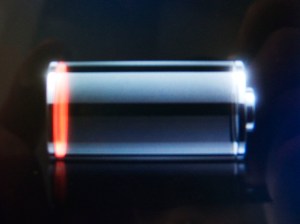
Did a Reset to Get iPhone 4S Battery Life Back to Normal

File this under #firstworldproblems, but somehow in one of the latest iOS updates or new app installs, my battery life on the iPhone 4S started dropping insanely fast, easily 5-10% per hour even when unused.

I’ve been using a Mophie battery case since SXSW, so I almost didn’t notice the real problem, but decided yesterday to go hunting for a solution.

I found a thread on the Apple support forums, and was skeptical, but gave it a try:

1. Reset all settings (GO TO: settings -then> general-> reset all settings)

2 a. Go through initial setup steps (lang, wifi, siri, enable location, etc) and choose setup as new phone (don’t worry your apps, data, contacts, mail will still be there). Do NOT restore from iCloud or iTunes (It can copy back corrupt settings)

2 b. If you do not get the complete new setup screen with language setup and setup as new phone or restore from iTune/iCloud backup, be sure to go back to #1 and reset all settings again (it should happen the second time)

3. Turn off system location services timezone and iAd (settings -> location services -> system services)

4. Fully discharge battery (until you get the spinning wheel and it shuts off)

5. Fully recharge battery (overnight if possible)

And 48 hours later I’m happy to report that my battery life has never been better. It’s nearly midnight now, and I was on a few hours of calls today, and the battery is at 14%.

YMMV, but worth a try if you are seeing issues.

couldn’t agree more — was a real honor to attend this past weekend, and Howard has that special touch when it comes to getting smart & interesting people together.

ethanaustin1's avatarStartups and Burritos

Stan Feld has gone viral! Β  photo credit: Dr. Stan Feld. Β 

I just got back from the best tech conference on the planet that nobody knows about.Β  It’s called Lindzonpalooza. Β Here’s how it works.

Every year, StockTwits CEO Howard Lindzon invites around 75 entrepreneurs, VC investors and Wall Street types to geek out in San Diego for a weekend, exchange ideas and drink on Howard’s tab.Β  Big macher, nerd-celebrities like Brad Feld, Jeff Clavier, Shervin Pishevar, and Paul Kedrosky are all part of the mix.*Β  And then for good measure, Howard invites a few peons like me to present at the conference’s Demo Day. Β For those interested, here’s a great summary of the demo day presentations.

(*apologies for the gratuitous nerd-celebrity name dropping)

In my opinion, conferences are like startups.Β Β  It’s always,Β alwaysΒ always about the people.

As a rule of thumb, strong startup teams make for…

View original post 287 more words

Google’s Augmented-Reality Glasses — Microvision technology ?

Really fun video today from Google on what they are working on in terms of augmented reality glasses – pure concept at this point, but we can all see where this is heading πŸ™‚

Plus if this came out a couple of days ago it could have been mistaken for an April Fool’s joke πŸ™‚

As I watched this video, i couldn’t help but think that this is very close to what Microvision has been working on for a very long time. (disclosure, I own some nearly worthless MVIS stock). They’ve been building wearable see-through displays for the military, doctors, and one day for consumers:

The Winners of SXSW 2012: Mophie & Eventbrite

I’m back from SXSW, which was fantastic this year. Each year I go I meet great new people and get a good vibe for what people are working on and are excited about.

But unlike previous years that had breakout startups (Twitter, FourSquare), this year nothing major took over.

Highlight was poised to be the big winner with a ton of installs the week before SXSW, but battery draining and not enough of a value-ad to the SXSW experience made most people who had installed the app switch it to “pause” mode.

So who did win ?

In my mind it was Mophie and EventBrite.

Mophie, the external battery/case for iPhone – was something I picked up on Brian Lam’s suggestion, and it was awesome and very popular at SXSW. With battery life at a premium, and outlets even more so, having an extra 75% charge on demand meant I never ended up with a dead phone. At SXSW you are constantly on your phone β€” checking-in, tweeting, posting photos to your blog, etc.

Eventbrite was used for probably 90% of the parties and events that I attended. With it’s super slick and simplified iPhone app, I never had to print out tickets or check for some random email to see a location of an event. In a crowded space, feels like Eventbrite is becoming the standard. My only wish list is that it had slightly better google calendar integration — right now it’s event by event as best I can tell, instead of a full feed the way Tripit and others work.