New WordPress.com Feature: Prologue

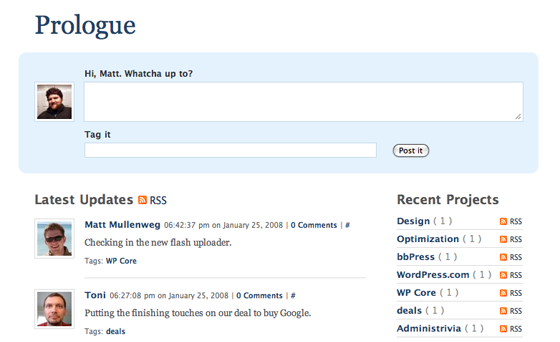
At our Automattic offsite last week, Joseph Scott and Matt Thomas created a very cool new WordPress theme that we plan to use in-house: Prologue.

Inspired by Twitter, you can see it in action in this live demo.  Prologue is also available as an open source theme to use with your self-hosted WordPress blog.

Full details here on the WordPress.com blog plus an early review on Mashable.

My gut tells me we’ll see some really interesting mods with this theme — can’t wait.

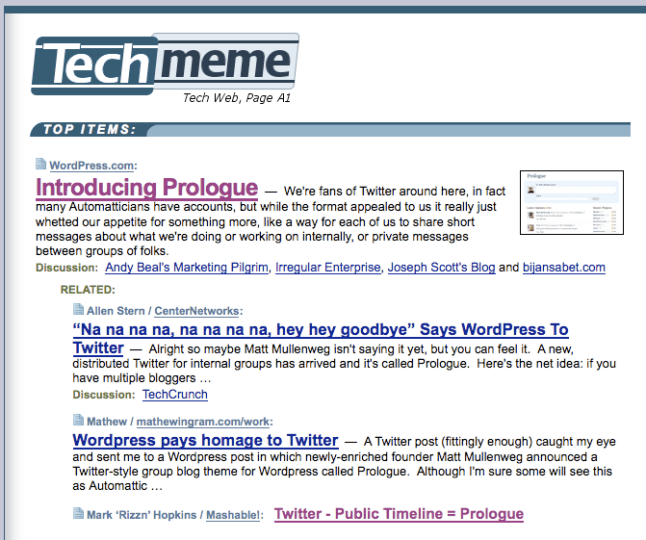
UPDATE: Lots of interest already — the announcement post just made the top of techmeme:
prologue

raanan.com has a new home: WordPress.com

This blog is blazing fast !

Why you ask ?  Because it’s now on the grid platform at WordPress.com 🙂    Up until now I’ve been running it on a server that I’ve had for a number of years.

The process of moving from a self hosted WordPres setup to WordPress.com was super simple.  For those who are interested, here was the proces:
Step 1) Exported the blog content from my old blog by clicking “export” in the WordPress dashboard
Step 2) Imported the XML file and the images from my old blog to WordPress.com with the 1-click importer in the WordPress.com dashboard. (image fetcher feature will be available soon on WordPress.com)
Step 3) Confirmed that everything was in place on the new blog — the importer brings everything in – posts, pages, images, youtube embeds and comments.
Step 4) Added the mapped domain option to my WordPress blog so that instead of raanan.wordpress.com, it becomes raanan.com
Step 5) Selected the blog.txt theme and applied it ( this theme will be released on WordPress.com soon ).
Step 6) Changed the name server settings at my registrar

And that was it.  What’s also nice is that I was able to get rid of the plugins I was using because that functionality is already bundled in with WordPress.com – including Akismet, Stats, and Gravatar.

Automattic news

Some very exciting news tonight – we announced a $29.5M series B round of funding.

Our CEO Toni Schneider summarizes it well:

Late last year we sat down to figure out how we’d like to expand our business in 2008 and beyond. Since things are working well, we didn’t want to make any major changes. However, we did set a couple of new goals. One was to put enough money in the bank to have financial security for years to come. Another was to invest more aggressively into our “other” products and services (other than WordPress) like Akismet, Gravatar, and bbPress. Today’s financing will help us achieve both of those goals.

Lots of coverage including: wsj , GigaOM, new york times, ReadWriteWeb, toni, and matt (sporting his new ma.tt domain !).

You can also track the discussion over on techmeme.

WordPress.com now offering 3 gigs of free space

We just announced a very big upgrade on WordPress.com

… everyone’s free upload space has been increased 60x from 50mb to 3,000mb. To get the same amount of space at our nearest competitor, Typepad, you’d pay at least $300 a year. Blogger only gives you 1GB. We’re doing the same thing for free.

Our hope is that much in the same way Gmail transformed the way people think about email, we’ll give people the freedom to blog rich media without having to worry about how many kilobytes are left in their upload space.

TechCrunch weighs in on the news & feel free to digg it 🙂

The Crunchies – watch it live

WordPress and Toni Schneider are nominated for awards at the Crunchies, which will be held tonight in San Francisco.

Seating opens at 6:45 pm and is first come first serve in the balcony. If you have a copy of our eticket, please bring it with you. If you do not have the eticket, no worries, we can check you in by name. Please arrive before 7:30. The ceremony will start at 7:30 and is expected to last until about 9:00 pm.

You can also watch it live here

Update: List of winners, including WordPress & Toni Schneider

MacWorld 2008 and an interesting stock trading tie-in promotion

Another exciting keynote from Steve Jobs today at MacWorld 2008 – in case you missed it you can catch-up on live.gizmodo.com. Just like the last MacWorld, Gizmodo’s live blog was hosted on WordPress.com as part of our VIP hosting program. ( you can read a “rating the livebloggers” review here)
update: watch the keynote & details on how other sites covering the event faired: Crunchgear, Engadget, and Twitter )

From a Mac product standpoint, I’m not totally convinced about the MacBook Air but definitely will check it out, and the Apple TV “take 2” is a huge improvement.

Shortly after the keynote this curious email offer arrived in my inbox:
trading.png

I definitely give them credit for linking their campaign to the millions of people out there with an urge to buy some new Apple gear !

The Great Sync on OS X: Google Calendar, Plaxo, address book, PocketMac and BlackBerry

While many people, including myself, can find plenty to gripe about with Outlook & MS Exchange , one thing that is rock solid is the over-the-air syncing with BlackBerry devices. Both email and calendar appointments sync fairly effortlessly and reliably.

In the non MS Exchange world syncing hasn’t been so easy, especially on the Mac side of the world. But with a bit of testing that I did recently with the google calendar mobile sync I think I’m finally in good shape.

Here is my setup.
for contacts: The Plaxo Mac OS X app keeps my OS X address book and plaxo.com in sync. My contacts don’t sync over the air to my BlackBerry curve, but when I plug my blackberry in to charge ( using a USB cable ) I run PocketMac which then syncs the contacts. I expect a plaxo blackberry sync client to come out in the future.
for email: The blackberry push email system does this all automatically, so no need to do anything extra.
for calendar: This was a serious pain point for me. I use Google Calendar and for the last few months I’ve been forced to basically use the WAP site for Google Calendar when I was on the go. It worked OK, but it meant no offline support. Now that Google Sync has been released my calendar updates in real time on my Blackberry — and works the other way — updating Google Calendar OTA if I make changes on my BlackBerry.

So there you have it. Definitely not as elegant as it could be, but finally everything is in sync !

OS X: Upgrading and Installing Leopard – pick the clean erase and install option

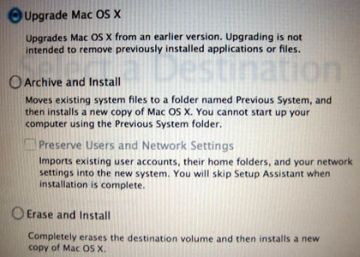
After waiting for Leopard to arrive I finally got my hands on it and went ahead with the installation. When you install your latest OS X you have a few choices:
leopardinstallloptions.jpg

In the past I’ve usually done a full HD backup, I then format the drive, and do a clean install of the new OS – using the upgrade as an excuse to clean house and get rid of all the crap that accumulates over time. But for some reason when I went through the process this time, the only option available to me was an “Upgrade”, which entails updating the OS as well as all applications and settings ( I later learned that perhaps having my external USB hard drive connected was the cause of that single option. )

So I rolled the dice and after doing the “upgrade” i noticed lots of sluggishness and beach balls a plenty !

So over the holidays I finally decided to do a full cloning of my hard drive using carbon clone ( which was simple and worked well ), and then proceeded with a clean install of Leopard aptly named “erase and install”.

Things are now snappy and that clean fresh OS feeling is quite minty ! You can also use the built in migration tools to transfer settings or just use the clone to copy over the “home” directory.

Where I’ve Been Facebook app jumped into my newsfeed

The Where I’ve Been Facebook application is a pretty cool app. I installed it a while back and haven’t really updated it in a while, but I’m a fan of seeing data visually displayed in a smart way — and this app definitely does that.

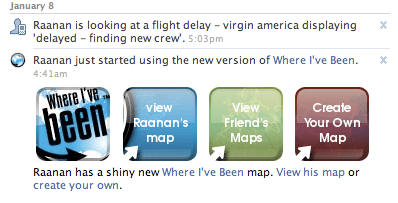
What I was surprised to see today when I logged into facebook was that my feed/profile had an update from that app:
where i’ve been facebook app

It states “Raanan just started using the new version of Where I’ve Been. Raanan has a shiny new Where I’ve Been map. View his map or create your own.”

What’s odd is that to the best of my knowledge I hadn’t clicked on any updates, hadn’t used the app in while, and never gave permission for this type of ‘spam update’. I looked through the various settings of the app but could not find any option to turn off this type of messaging in the future.