news
We Need a Definition of High-Speed Broadband
< rant >
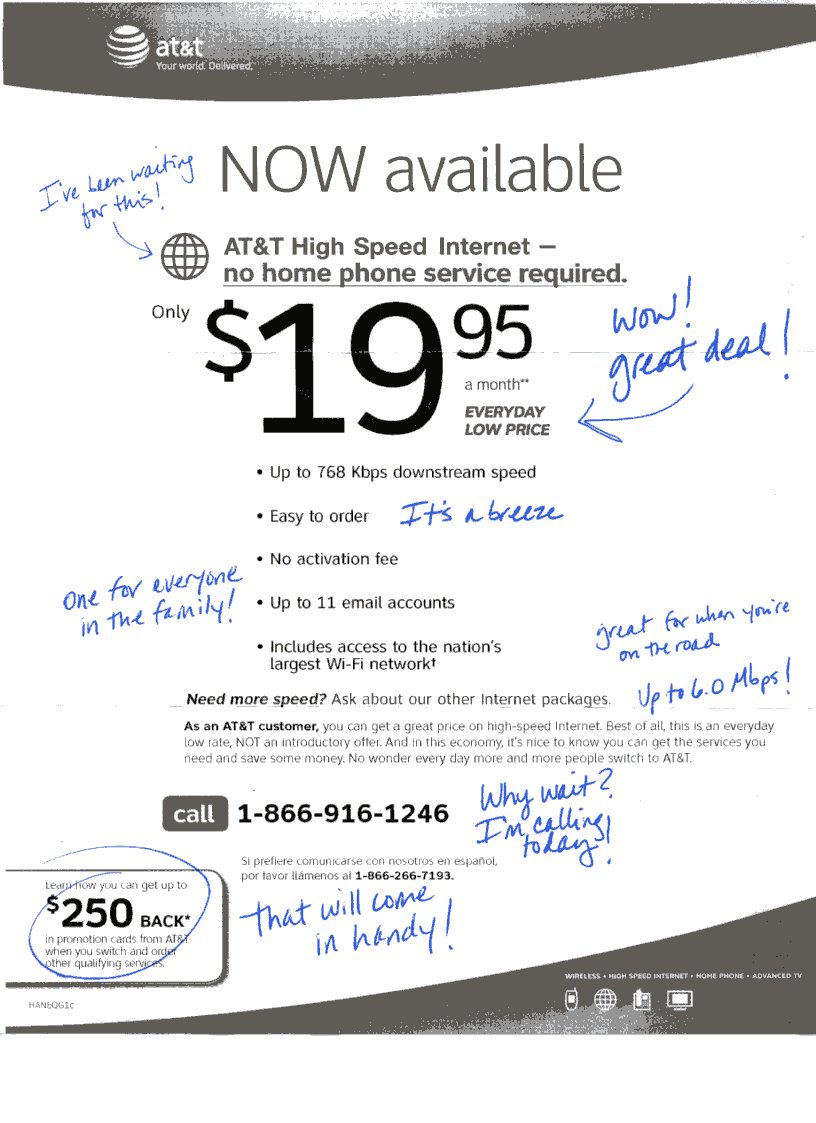
I sometimes wonder if we need to take some real action to define “Broadband” and “High-Speed” internet services. The range of what is considered high-speed or broadband in the US seems to range from 768K DSL to 50 Mbps fiber.
A good example is a flyer from at&t I received last week that was literally slipped under my front door. The people behind these ads obviously don’t read my blog and what I’ve written about broadband 🙂 Here is the scan of the ad below — notice the “high speed internet” claims with “up to 768 Kbps” downstream speeds:
The current FCC definition of broadband is pretty emblematic of the problem too:
What Is Broadband?
Broadband or high-speed Internet access allows users to access the Internet and Internet-related services at significantly higher speeds than those available through “dial-up” Internet access services. Broadband speeds vary significantly depending on the particular type and level of service ordered and may range from as low as 200 kilobits per second (kbps), or 200,000 bits per second, to six megabits per second (Mbps), or 6,000,000 bits per second. Some recent offerings even include 50 to 100 Mbps. Broadband services for residential consumers typically provide faster downstream speeds (from the Internet to your computer) than upstream speeds (from your computer to the Internet).
As more and more of what we consume online requires real broadband, you see services assuming at least 1.5 Mbps connections, such as the new OnLive gaming service:
What kind of Internet connection do I need to use the OnLive Service?
OnLive works over nearly any broadband connection (DSL, cable modem, fiber, or through the LAN at your college or office). For Standard-Definition TV resolution, OnLive needs a 1.5 Mbps connection. For HDTV resolution (720p60), OnLive needs 5 Mbps.
You could easily see someone signing up for that 768K service and thinking they have broadband, when most web developers would think of them as near dial-up 🙂
The Solution: So while some ISPs battle it out mainly over pricing, I think it would be helpful for a coalition of web companies to declare the minimum speed for broadband for both up and down speeds ( I would argue 3 Mbps down, 1.5 up for 2010) as it related to the services they are offering, and even put together a schedule to increase the minimum requirements over the next 5 years so we get to something closer to what my colleagues in Japan have.
We could then have a site called something like doireallyhavetruebroadband.org that would do a speed test, and tell you where you stand with your ISP, and where to get real broadband if you don’t have it.
Now I realize most people are lucky if they have more than one broadband provider in their area, but with more wireless options out there these days, and markets getting more competitive, I think this would be a good start and would help consumers make the right choices – and ultimately make the web better.
</rant> 🙂
Subscribe to raanan.com via Email
Tonight, on WordPress.com, we launched Email Subscriptions.
You can now subscribe to this blog via email and get nicely formatted posts delivered in your inbox whenever I publish something new. Just put in your email address into the sidebar widget on the right, titled “Email Subscription”. If you are logged in to WordPress.com it’s just 1-click, but anyone can subscribe, you don’t need a WordPress.com account to use this.
With various options like RSS readers, Twitter, and Facebook — I’m still impressed by the usefulness of receiving certain updates by email. Maybe out of habit from my NY subway days, but I still read paidContent.org daily summaries via email every morning.
Like paidContent, what’s also cool about this new email subscription feature is that you can elect to receive digests:
When a user subscribes to a blog they will receive an email containing recent blog posts. The subscriber can select how often this email is sent (the delivery frequency – immediate, daily, or weekly), as well as when this email is sent (the delivery window – a specific day and hour).
If you’d like to learn more, check out the announcement post.
I’ve Got Hurt Feelings
I haven’t kept up with this show, but this is hysterical — from HBO: Flight of the Conchords:
WordPress.com: The Hero Is In Your Pocket
We had our company off-site last week, and we worked on a ton of really interesting projects that will be launching in the coming weeks.
The first project is now live, and it’s the launch of mobile themes on WordPress.com to specifically format the blogs for smart phones, and also for standard mobile phones. It works automatically to detect mobile visitors, and even pulls in a custom header to make the look & feel unique:

So if you have a mobile device handy, check out raanan.com on your mobile browser to see it in action.
The Perfect Home Office Chair
I’m in the market for a new home office chair. My 8 yr old Herman Miller Aeron chair is on loan, and my backup $50 chair is totally busted.
Anyone have any recommendations ? It needs to be useful for those regular 18 hour days 🙂
I’m a bit on a budget, but chairs are usually good for a few years so I don’t mind paying a bit extra. I also have a pretty big discount I can use on any Steelcase chair, so I’m looking at those more carefully.
WordPress iPhone Stickers
I’ve had a lot of people ask me about these WordPress iPhone stickers that are popping up all over the place:

photo from @arrington
We did a pretty good job hiding their availability for a while, but you can now pick them up over at shop.wordpress.net. I can confirm that they work nicely on an iPhone 3G and the new iPhone 3GS.
WordPress for BlackBerry Beta
Go check out the details and install the beta: blackberry.wordpress.org/2009/07/07/wordpress-for-blackberry-beta
Tesla Roadster on Golden Gate Bridge
I’m not a really a car person per se, but seeing the all electric Tesla Roadster the other day was a thrill.
I was driving back home and approaching Golden Gate Bridge when this silent car passed me on the left. The car looked awesome, and the mere fact that there was no tailpipe made an impression. There was something very “Need For Speed” -‘ish about the way the car moved, like it was in a video game, very effortless. I had seen coverage of this car before, but never seen it on the road.
The license plate read “Tesla 84” – so assuming this is the 84th one made ? Here are some spy shots I was able to take from my iPhone:
Vodpod videos no longer available.
Mozy Online Backup Service Review
Mozy to the rescue ! After the loss of my laptop and external HD, I was able to use the Mozy backup service to restore most of what I needed. I’ve been using Mozy for nearly 3 years, and this was really the first time I had to “use it” — so a few thoughts:
The good::
– Hey it worked 🙂 They are now owned by EMC so that gives you a bit more confidence too.
– I paid for the “DVD restore” option after the web option didn’t quite work for me ( more on that below ) and I was pleasantly surprised to see a fedex package appear a few days later. But instead of a few dozen DVDs, they sent a 160 gig Iomega external HD. Very cool ! Not sure if I got some extra nice service or if that’s standard for them now with HDs being so cheap — but I was glad to not have to manually copy over all those DVDs.
– I used the live chat support option a few times and they were pretty helpful and always followed up via email later to make sure I was all set.
– For $5/month per machine this seems like a really great option.
The bad:
– The web restore option, which is an instant way to retrieve your backup, has a somewhat clumsy interface. There is a web interface for data under 20 gigs, and then you can use the Mozy client (OS X and Windows ) to restore files as well.
For me I was restoring from another machine, so I wanted to use the web restore version and not sync up another machine into Mozy.
For some reason, which may have a sound technical explanation, the web restore is available only in 1.8 gig DMG files. So downloading and then stitching it back together is a manual process.
– The other issue is on how to actually pick the restore. When I selected the entire backup, the web restore was actually twice the size of my backup HD. The external HD backup they sent me was smaller than their 2X web restore. Maybe it was a bug, or maybe I did something wrong, but that seemed very odd.
– Related to the above, when I got the backup there was lots of duplicated files which i had moved to different directories on the original machine. Looks like Mozy always keeps a backup of what you had and then keeps adding to it. There is an option to restore a “backup set” by date, but when I looked at it I saw lots of missing files.
The “not Mozy’s fault” but an issue with our lousy internet access
– I mentioned at the top that I was able to “restore most of what I needed”. The reason I couldn’t restore everything was because some of the files I was working with were huge and Mozy had not had a chance yet to back them up. For me, and I suspect many of you, Mozy was often a few days behind on uploading all the new stuff. Om Malik talked about this issue last month, The Ugly Truth About Broadband: Upload Speeds.
Conclusion:
I’m thankful that I had some kind of online backup in place for when the unthinkable happens and happy that Mozy worked.
When I asked the question of what kind of backup strategy people use, I was surprised by how few use an online service:
I’ve also rethought what I’m actually backing up and if I can streamline it a bit. I use a bunch of cloud services already, so lots of what I had backed up was available from other services.
I’m also looking at using DropBox and Syncplicity to handle the task of light backup, but really for syncing across multiple machines.
And since it’s been 3 years since I looked at this space, I’m going to test out Jungle Disk and a few others just to see if they are a bit more elegant on the restore side of things. Jungle Disk in particular seems attractive since they don’t charge you for each extra machine you link up.
 Raanan Bar-Cohen
You must be logged in to post a comment.