What do the WordPress VIP Workshop & the Google exec team retreat have in common?

While reading this post about Google & Larry Page on Business Insider, I ran across this blurb:

In February 2013, Google’s senior executives flew in from around the world to meet at the Carneros Inn, a rustic resort in the hilly vineyards of Napa Valley. This was Google’s annual two-day, top-secret retreat for senior executives.

Carneros Inn is a magical place – and is also home to our annual VIP Developer Workshop.

Enabling Google Now on iOS and use Google Apps ? Head to your admin settings

Google just updated it’s main (and under appreciated) “Google Search” iOS app to include Google Now support, which was Android-only up until now.

I updated the app on my iPhone, but it didn’t work, and asked that I check some settings.

Turns out if you are running Google Apps, you need to enable Google Now under the main google apps dashboard in the Mobile settings for “Android”:
google-apps-google-now-ios
Not super intuitive 🙂

What is Google Now ? Here is an overview video below:

Eight Things to Fix in Offline Google Mail

Way back when, I used to use Google Gears to run gmail in offline mode in Firefox – usually when on a plane without wifi. Eventually Gears was retired, and a while after that, Google released a chrome app called Offline Google Mail that looked to do most of what you could once do with Gears.

I know I can install Thunderbird or run Mac Mail to do email offline, but I like the idea of using just my browser and not installing or running other client apps.

So on a recent trip Virgin America had non functioning wifi, and on the other leg it just barely worked. So I figured I’d put Offline Google Mail through it’s paces. What I found was pretty lacking and I took some notes 🙂

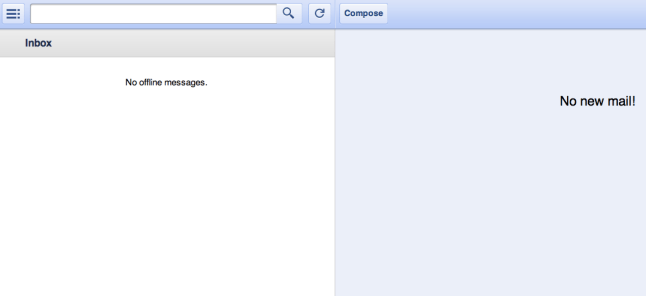
  • 1) This is a biggie. It won’t work if you are offline ! WTF you may say ? “Offline” is in the app name. Yes, but to make it work, you need to first launch the app while you are online and then keep the browser open. Otherwise you see some version of the screenshot above.  This seems like something that has to be fixed — as you never know when you might need offline access, and certainly don’t want to have to plan for it.
  • 2) Reply-all always CCs me the sender. Small thing, but annoying to have to remove yourself each time if there is more than one person on a thread.
  • 3) native spell checker doesn’t work.
  • 4) can’t force plain text mode in reply, you get stuck in this visual/rich mode which I’m not a fan of
  • 5) no option to send & archive, which is my default in gmail
  • 6) A biggie. It doesn’t detect the email address (i use multiple ones) to which the email was sent to. Unlike desktop gmail – which replies from the account the email was sent to
  • 7) When I click save, it picks a different time zone than my machine’s. Maybe that’s a gmail/calendar thing — but causes confusion.
  • 8) Another biggie. It doesn’t download attachment or images, clicking “show images” doesn’t do anything. Would love an option to include attachments.

Too bad it’s not open source — could send in patches 🙂

Anyone else have a better setup or recommendation ?

I see other complaining too:

Google Plus Thoughts

I’m really impressed with the launch of Google+. Given the number of people internally @ Google who’ve been dogfooding this, it’s equally impressive that it was kept under wraps for this long.

After using Google+ for a few days – wanted to jot down some early impressions:

  • Having the new toolbar across all Google services is a huge deal. Whatever I’m doing during the day, good chance I’m on some Google property at one point, and seeing that little red notification box for Google+ is likely to draw me in for a few minutes.
  • Email notifications were defaulted to on – and while I’ve since turned most of them off — the initial flood of emails that I’m sure everyone saw with people getting added to ‘Circles’ – gave the service that feel that everyone is joining up. Totally opposite from the Buzz launch, where everything was just ‘on’ day one.
  • One problem I’m having though, is that I don’t recognize a big chunk of people that are adding me — similar to the Twitter followers for most people I would guess. Would be nice to have the Google People widget (or for bonus points Rapportive) integrated somehow (or simply on hover) to get a 360 snapshot of who these people are.
  • I’m a google apps (for your domain) power user. As best I can tell, Google Apps users have been excluded from the initial Google+ rollout, so I’ve been using my google account/gmail account. I’m hoping that’s the right decision, and that I won’t need to redo everything I’ve done so far with my Google Apps account at some point.
  • Related to the apps account — on Android, the Google+ app doesn’t find my gmail account — keeps trying my main google apps/domain account.
  • I tested uploading a photo, and it forced me to also create an album — found that a bit odd
  • How do I push my WordPress posts to Google+ ?  I’m guessing that’s coming soon when the APIs are unveiled – but would have been nice to see an easy way to do that day 1 – or maybe I missed it ?

Overall: I think Google+ is a product that is going to gain some meaningful market share — and quickly. They’ve seemingly taken all the criticisms of the other services and addressed them – especially with Circles. And now we’ll see how all the services will compete head-to-head.  One thing’s for sure, it’s great to see some competitions and innovation in this space and Google deserves huge credit (at least so far) for keeping at it, and not letting Buzz, Wave, and a few other launches deter them from tackling this space – i.e. a good lesson at not listening to your detractors, and just keeping your head down and working on good products.

Google Apps and Gmail Fix “On behalf Of” Issue

[tweetmeme]
When I switched to Google apps for my personal email back in January 2008, my #1 wish list item was to:

* Fix the “on behalf of” issue. If you use multiple email addresses, gmail and google apps are easy to setup to receive those emails. But when you send out using those non gmail/google apps addresses, certain recipients – especially those using Outlook – will see a “on behalf of email@gmail.com” in the “From” field.

This past Thursday, Google announced that they had fixed this issue, by allowing you to send out from your domain’s smtp server, thus dropping the “on behalf of” portion.

This is good news 🙂

I’ve been using Mac Mail and Thunderbird for a while in conjunction with google apps, so after tweaking my settings, I decided to try a few days of just Google apps for all my email accounts. Here is what I learned:

The good:

  • Love having just one single inbox
  • The Archive button is even more useful for work emails since the volume of email for me is pretty insane on most days

The bad:

  • The signature feature is pretty weak. You can’t set it per account, and you can’t have different versions. I did find this Firefox add-on, Black Canvas, that looks promising — but it doesn’t seem to work in google apps right now
  • If you rely on the google built-in mail fetcher to retrieve email, you’ll be waiting 20-60 minutes for new email – which is a problem. The work around is to have your other accounts forward all you email to your main gmail or google apps account, that way it shows up instantly
  • Address book issues. I haven’t sync’d my contacts with Google contacts yet, so finding an email address is a bit clunky. I have everything in my OS X address book sync’d nicely with my iPhone right now, so I haven’t gone down the Google contacts road yet — plus I’ve heard some stories of problems of late, so thinking I’ll wait a bit
  • No Gravatar support, so i can’t see the avatar/photos of the people I’m emailing with. I tried my colleague Jon Fox’s greasemonkey script but it’s not working — could be again b/c I’m in google apps. Would be nice to see Google support the Gravatar service, and other avatar services, natively ( Google folks, feel free to contact me if you’d like to chat about this )

Wish List:

  • While google apps email search rocks, I actually miss my desktop client search feature where as I type I see results. In general I think google could do a better job with search on email, such as having “did you mean” based on my index, and better snippet highlighting, as well as some kind of live results
  • Native iPhone app. The safari/mobile web version is getting better, but you can’t top the speed of a native app right now

Search / Sync Tip:
If you’ve been using a desktop mail client via IMAP like Thunderbird for your other accounts, google apps/gmail won’t have any of your sent messages. I find that I’m often searching for emails that I’ve sent, so this was something I needed to address. What I’m testing right now is a way to copy my sent messages into google apps. I loaded up all my accounts and the google apps account via IMAP in Thunderbird, and then started copying my Sent Folder messages from my other accounts into my google apps sent-mail folder. So far it seems to be working, and syncing up nicely.

Conclusion:
Very promising so far. If I can get the signature issue sorted out I’d be happy and may switch to this setup for all email.

Testing:
I’m also testing out an interesting desktop/web hybrid app called Mailplane on my colleague Andy Peatling’s suggestion. Their tag line is “Mailplane brings Gmail to your Mac desktop”. I haven’t used it enough yet, but it integrates nicely with your OS X address book, growl for notifications, and in beta is gears/offline support as well as HTML signatures. Checkout their 2 minute video overview for a good summary.

WordPress.com Gears

It’s been live for a few days, but now we have officially announced Gears support for WordPress.com.

WordPress version 2.6 ( currently in beta ) also has Gears support.

So what is Gears ?

Gears? It is a browser extension like Flash or QuickTime/Media Player. However Gears works with the browser to enhance web based applications. It can create local database and file storage, and run JavaScript in the background to update them without slowing down the browser.

Gears has been in the making for over a year and is well known among the web developers. Currently it supports Firefox versions 2 & 3 and Internet Explorer versions 6 & 7. Safari 3 support is coming soon.

On WordPress.com it is used to store all images and other web page components from the admin area to the user’s PC, speeding up access and reducing unnecessary web traffic.

The speed increase is most noticeable when Internet is slow or on high latency and makes everybody’s blogging experience more enjoyable.

How do you turn it on for your blog ?

To enable this new feature, click on the “Turbo” link and follow it to Gears’ site to install it in your browser (if not already installed). Then the browser will have to be restarted and after logging back in WordPress, click the “Turbo” link again to give permission to Gears to work on WordPress.com.

After that Gears will download around 200 files and store them on your PC. It will also update them when needed automatically in the background, no other actions are required.

Update: you can follow the coverage over on techmeme: http://www.techmeme.com/080702/p72#a080702p72

Apparently My Family is Secretly Making Gmail Better

A few months ago I switched from gmail to google apps for personal email and subsequently also moved over a few of my family members.  Little did I know that these family members have been secretly working on new cool gmail features as part of Google’s “Labs” effort.

Take a look at what appears at the bottom of my google apps email settings page 🙂

And joining the “Bar-Cohen Family Mail team” has many benefits:

The team
We work on lots of different things: making email better, faster, and more fun, and developing new ways for users to share and communicate with each other. We take on hard computer science problems — like making large amounts of Javascript run insanely fast on different browsers, storing and scaling petabytes of data, and ridding the world of spam. And Gmail is like a start up inside Google. You can build and ship new stuff quickly, and enjoy all the great benefits Google is known for.

Gotta love it !  🙂

Switched to Google Apps for Personal Email

Over the holidays I was testing Google Apps and except for a small false positive spam issue with google alerts — I was really impressed.

The reason I was testing it was to see if I could replace my gmail account with one of my own email accounts, using my own domain — but running on google apps. Google Apps essentially allows you to use all the Google services like email, docs, calendar, etc — but using your own domain (i.e. myname.com).

The main motivator for me was to have a permanent email address that had great web interface, and also pop/imap support for a desktop client.

My old personal email setup:
* hosting: running on my own server
* Spam: using SpamAssasin to filter out spam. It worked fairly well but required some maintenance overhead of keeping up with new versions and tweaking the spam’s whitelist was a chore
* Webmail: the default Squirrel webmail was good, but not amazing
* Search: using Thunderbird for search when you had gigs of email was tough, and webmail search was OK

My move to gmail:
Then in July 2004 I signed up to test gmail and was amazed. I was tired of endless mailboxes/archive rules/folders of the Outlook/Eudora/Thunderbird world. Gmail had:
* awesome search
* no folders ( but simple & powerful labels )
* virtually unlimited storage
* killer feature — the threaded view which I’m amazed hasn’t been copied by every mail provider (and conversely i’m amazed gmail doesn’t offer a non-threaded view for people who just hate the threaded model)
* really solid spam protection

In addition to gmail’s great features I found that I needed a google account to use i-google, google reader, google webmaster tools,etc and I quickly found myself just using the gmail address as my person email address, and forwarding all my old accounts to the gmail address. ( since then google has changed the google account setup so you can use a non-gmail address for google services )

I can still easily call up the Gmail welcome email:

You’re one of the very first people to use Gmail. Your input will help determine how it evolves, so we encourage you to send your feedback, suggestions and questions to us.

I recall emailing in and saying that they should support domain mapping so you could have email@yourdomain.com. Fast forward a few years, and google now has that option. I quickly set it up on google apps, made some DNS changes and was up and running in no time.

Google Apps
I’ve been using google apps for about a month now, and here are a few observations:
* the free version I’m using is perfect for my use. They do offer premium options of larger organizations.
* everything you would expect with gmail you have with google apps – including docs, calendar, etc
* the mobile blackberry app for google apps works great
* with the calendar there are some extra features for people “on your domain” to always have access to your calendar
* outside services that provide a way to grab your gmail address book ( such as facebook ) do not work with google apps – this could be considered a good thing for some people 🙂
* moving my gmail emails to google apps was relatively painless. Details & lots of discussion at Scott Hanselman’s blog.

WordPress.com Support:
If you have a blog at WordPress.com and are using a mapped domain as I now do with this blog, you can enable Google Apps for that same domain. Details are here in our faq.

Wish List:
* Fix the “on behalf of” issue. If you use multiple email addresses, gmail and google apps are easy to setup to receive those emails. But when you send out using those non gmail/google apps addresses, certain recipients – especially those using Outlook – will see a “on behalf of email@gmail.com” in the “From” field.UPDATE: Now fixed.

Conclusion:
Pretty much a no brainer. If you love gmail, want your own domain, and like having the safety to know that you can pop/imap your email, and move it at any time — google apps is a great choice.

The Great Sync on OS X: Google Calendar, Plaxo, address book, PocketMac and BlackBerry

While many people, including myself, can find plenty to gripe about with Outlook & MS Exchange , one thing that is rock solid is the over-the-air syncing with BlackBerry devices. Both email and calendar appointments sync fairly effortlessly and reliably.

In the non MS Exchange world syncing hasn’t been so easy, especially on the Mac side of the world. But with a bit of testing that I did recently with the google calendar mobile sync I think I’m finally in good shape.

Here is my setup.
for contacts: The Plaxo Mac OS X app keeps my OS X address book and plaxo.com in sync. My contacts don’t sync over the air to my BlackBerry curve, but when I plug my blackberry in to charge ( using a USB cable ) I run PocketMac which then syncs the contacts. I expect a plaxo blackberry sync client to come out in the future.
for email: The blackberry push email system does this all automatically, so no need to do anything extra.
for calendar: This was a serious pain point for me. I use Google Calendar and for the last few months I’ve been forced to basically use the WAP site for Google Calendar when I was on the go. It worked OK, but it meant no offline support. Now that Google Sync has been released my calendar updates in real time on my Blackberry — and works the other way — updating Google Calendar OTA if I make changes on my BlackBerry.

So there you have it. Definitely not as elegant as it could be, but finally everything is in sync !
